
[youtube http://www.youtube.com/watch?v=7IjCN_a__k0]
With the end of Livescribe’s Development Program, it is no longer possible for end users (or even developers) to download the SDK and deploy any of the numerous Custom Paper Products made by developers such as myself (among others). For a while now, I have been discussing the possibility of Livescribe creating and releasing a tool that installs third party Custom Paper Products to their smartpens. For various reasons, none of which will be discussed here, Livescribe did not release such a tool. I have been toying with the idea of building one myself for the last year, however I have not done so assuming that Livescribe will at some point do so. At this point, with Livescribe closing their Developer Program, it is obvious that they will not be releasing such a tool now.
The other reason I was hesitating with building this tool was that it would be coded in C# which I have had zero experience coding in before. I’m primarily a Java programmer with experience with both C++ and PHP (all of which use very similar syntax). Seeing no tool forthcoming from Livescribe and not wanting Custom Paper Products to be a product of the past (no pun intended), I finally dove right into it! I During this process, I learned that C# is nowhere near as complicated as I feared and most of the Syntax still applies from C++. With minimal googling, I was able to build a fully functional Custom Paper Deployment Tool using Microsoft Visual Studio 2010 as my Integrated Development Environment (IDE).
Please note that the Custom Paper Deployment Tool is not supported by Livescribe in any way, shape or form. As the Developer Program has ended, this tool is not associated with it at all. There is no warranty (either explicit or implicit) on the tool. I do not take any responsibility if anything adverse were to happen to your smartpen because of my tool. By going to the bottom of the page and clicking-through to the installer page, you agree to the terms and conditions listed above. This tool is available freely to all users by following the download link at the bottom of the page.
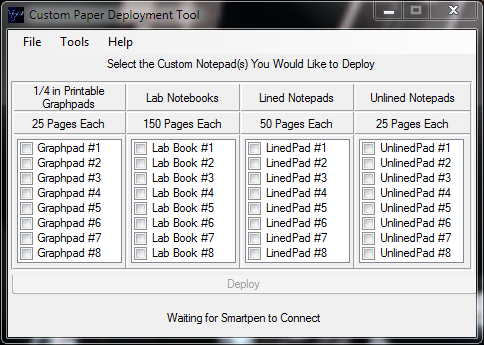
This is version 1.0.0.5 of the Custom Paper Deployment Tool. This version allows you to deploy only Custom Paper Products that are bundled with the tool. Future versions of the tool will allow the user to specify the Custom Paper Product via an .afd file to install. The Custom Paper Deployment Tool must be started before the Smartpen is connected or it fails to detect it. In case you have already connected your Smartpen after starting the Custom Paper Deployment Tool, reconnect it after the Custom Paper Deployment main window has loaded. Once connected, just check the boxes of the Custom Paper Products you would like to deploy and once you completed your selection press the Deploy button to deploy them to the Smartpen connected. Please make sure to only have one Smartpen connected at a time or you will confuse the Custom Paper Deployment Tool and possibly corrupt the firmware on all Smartpens connected. Deploying Custom Paper Products will take some time (usually around 5 seconds for each Custom Paper Product selected) as each one will have to be deployed individually. Please make sure not to disconnect the Smartpen until the Deployment process is complete at which point your Smartpen will show the time again.
You will then need to print the PDF files that correspond to the Custom Paper Products you deployed. Those can be accessed via the Tools” –> “Print PDF Notepads” option. “Tools” –> “Smartpen” has two options: “View Smartpen Data” and “List Installed Paper.” “View Smartpen Data” will provide basic information about your Smartpen such as free space as well as battery levels. “List Installed Paper” will display a list of all installed Paper Products (Official and Custom) on your Smartpen. All of these functions support writing the data to a log file by pressing the “Save to log file” button.
Currently the Custom Paper Deployment Tool supports the deployment of 4 different types of notepads with 8 notepads of each type. If you are ready to begin, you can go to the Custom Paper Deployment Tool Install Page.
Any questions or comments can be posted below and I will respond shortly. Please be aware that I have not digitally signed these install files so they will give a “Security Warning” because of an “Unknown Publisher.” There is however no security concern with the download and the install.
Update: 8/4/11 @ 3:09 PM EDT
I just pushed out several updates to Custom Paper Development Tool to deal with deployment errors. The current version is 1.0.0.13. If you did manage to get it installed despite the errors, your downloaded copy should automatically update to version 1.0.0.13 next time you start it.
Update: 8/22/11 @ 1:51 PM EDT
I know there have been severe problems with DNS (provided for free by http://xname.org) as well as web server overloads so I have finally setup deployment using Amazon’s S3 service for reliability and stability. The link above has been updated to reflect that change. If you have a working copy of the download, it is not required that you uninstall and reinstall using that link, but it is recommended for future updates. Thanks for your patience!
Update: 10/08/11 @ 12:13 AM EST
Version 1.2.0.0 is now released which allows deployment of user supplied .afd files through the “File” –> “Open” menu. The full changelog can be found here. Your installed version should prompt you to update it when you start it next, but if it doesn’t, you can always click the big download button below.
Update 02/22/20102 @ 11:39 PM EST
Added a new video at the top of the page with detailed use instructions. It provides a demonstration of all of the functionality built into Custom Paper Deployment Tool.
You sir, are absolutely amazing.
This is what I've been looking for.
You made a student's life so much easier.
If only Livecribe wouldn't get so greedy and try to make huge profits off the paper they sell, the world would be a better place.
Thank you again. Works flawlessly.
You are very welcome! I'm glad I was able to help!
hi rohan,
would your pages be recognized as a page of a currently-being-used notebook or would the pen see the graph pages as a totally new notebook? i didn't see numbers on your pages the way livescribe's notebooks do, so i'm hoping your pages may be a way around being limited to one notebook at a time.
also, i saw you answered someone's question about being able to export into microsoft excel. would it be possible, with your graph paper, to make charts that would be recognized by by microsoft word as a table?
and thanks so much for sharing this amazing paper and project!
Each notepad listed on the deployment tool would be recognized as it's own unique notebook. They do have page numbers as Livescribe notebooks do but they do not display in Livescribe Desktop (by design). There is no limitation to use one notebook at a time, you must simply make sure you are only using one of each notebook name/type at a time. As in only use one "Printable Graphpad 1" at a time. But you can certainly use any of the other Printable Graphpads (or others) simultaneously
I can tell you that while I have not tried it at all, my feeling would be no, that it would not be able to recognize charts. I would recommend you try with MyScript for Livescribe (the text recognizer) and see what happens.
Hi, Im sure this has already been solved but I'm new to livescribe. I just bought an 8gb echo smart pen for my wedding. My plan was to use the smartpen on my guest sign in book to creat a digital guestbook that can be manipulated when creating photobooks, thank you's, ect. Is there a guest book template for dot paper or a vender that I can buy one from. It needs to be "presentable", my fiance's words. Thank you for any help.
Jason,
The best I can offer are the unlined/lined notepads (that are downloadable as part of the tool linked above). I would recommend having your fiance take a look and see if she thinks them presentable enough. As for any actual templates for guestbooks, I haven't seen any and due to the close of Livescribe's Developer Program, it is very unlikely that you will see any new ones. Please see this post for more details: https://rohankapoor.com/2012/01/livescribe-we-want…
Rohan,
I am new to the livescribe pen technology and only began using it because my professor is requiring it to teach our college algebra class. it seems like a great thing but the paper issue concerns me…and apparently many others. i'm not super techno savvy and was curious about your product. does it give me the capability to print blank sheets of paper that i can then use with my echo pen? i know that the livescribe desktop has an option for printing blank sheets but i don't have a printer at home. however, i do have a $25 printing balance at the university every semester. unfortunately, i can't print from my laptop to the university printers, none of the school computers have livescribe desktop installed and it's not an option to print the sheets from the livescribe website.
is this a problem your program could help me with?
Jess,
Yes this software is a possible solution to your problem. What you would do is install this program (see download link above) on your laptop. You would then deploy the notepads that you wanted to print and then click the print pdf's button in the tools menu. Instead of the printing the PDF's, copy them to a USB pen/flash drive and then go to your university computer. From that computer open the PDF file(s) and print them making sure to disable page scaling in Adobe Acrobat.
Let me know if you need any more help.
I chanced upon this, and what a piece of programming! I purchased a pen and installed this software, and printed off a notebook after deploying it, and it worked perfectly well, using a basic home printer! Once I get to work I'll print more off using the "posh" one!
I take my hat off to you for your perseverance, something Livescribe should promote!
Thank you again
OS Windows 7 Home and Ultimate 32 bit and 64 bit
I am very glad to hear that you liked the software and that it worked well for you! That was my original intent with this software to allow people with "basic" home printers to utilize custom paper.
Hi Rohan
I downloaded and installed the CPD tool, deplyed a LinedPad #1, printed off a couple of pages from the pdf, but the pen fails to recognise the paper. I am using the 8gb echo, with the latest firmware released by livescribe about a week ago. Any help on this would be appreciated greatly.
Thanks
Hi Rav,
Are you getting a specific error message from the pen? Can you click "Tools" –> "Smartpen" –> "List Installed Packages" and verify that the LinedPad is actually deployed there?
Hi Rohan
Thanks for the great service that you are providing. Unfortunately for some reason I cannot download the application. It begins the download process on two different systems and stops at exactly 208Mb. It comes up with am "Application download did not succeed. Check your network connection, or contact your system administrator or network service provider. Under details in the error log it seems to indicate that "The server committed a protocol violation. Section=ResponseStatusLine". Any ideas on how I can download your impressive app? Thanks again!
From what I can tell, that error appears due to VPN's or Proxy servers losing an http packet during the transmission. Can you try the download without the VPN or Proxy server connected (direct connection if possible). The other possibility appears to be a server error but it's working for many other people which leads me to believe the problem is at your end.
Let me know if that helps,
I am having the same download problem. I am not sure what changes need to be made to get this file to download completely. Could this file be placed in another server for download. Or, could it be made to download where it can be continued if it fails so it does not have to start over? Thank you.
Unfortunately the nature of the deployment technology (Microsoft ClickOnce) does not allow a file to be partially downloaded and then restarted from there. If you are connection through a corporate connection, please talk to your IT people and have them look and see if their are any proxy/vpn settings that would be breaking your download.
I have need of a custom reusable blank calendar and scheduling paper for my business to use with my livescribe pen. I have been asking for some time now for some one to create these pages, alas no one has steped up to do it and I do not know how to do it on my own. Will this program help me to do that with my livescribe pen? Or can you help me to do this? PLEASE… Thank you for your time and consideration.
This program will not help you do that. All it does is deploy notebooks that exist already. Unfortunately as Livescribe has closed their Developer Program, there is no way to create such a calendar anymore. My recommendation to you is to tell Livescribe that you want the Developer Program back by following the directions here: https://rohankapoor.com/2012/01/livescribe-we-want…
Rohan,
your video on your toolkit is very nice…
Congratulations.
Istvan
Thanks Istvan!
Hi,
I will soon have my first livescribe echo.
I installed Custom Paper Deployment Tool but after opening, (without conecing livescribe) it stopped working. I have vista x32. What should I do?
I have not tested it personally on Windows Vista (never had a computer with it myself) but my guess is that you didn't install Livescribe Desktop which installs the necessary drivers for this Custom Paper Deployment Tool to run. Please install Livescribe Desktop and then try running the tool again.
Thanks verry much for your work and answer.
I try to install Livescribe Desktop from http://www.livescribe.com/en-us/starthere/ on two PC with Windows Vista x32, and Windows Vista x64, but i have the same "decompression error". 🙁 I have now my first livescribe echo and I am in trouble becase this installation error. What can I do?
But, I successfully printed the ruled notebooks from your websitsite on my HP inket printer! 🙂 This is great! Thanks again!
It would be great if you could put the grid notebook A4 in PDF format on your website.
According to Livescribe's Knowledge Base, you should follow these instructions to get the stand alone zip installer if the main installer fails to download for you: http://support.livescribe.com/entries/20355027-85…
In regards to creating A4 notepads with grids, please see this post as currently I am unable to do so as Livescribe has closed their Developer Program. https://rohankapoor.com/2012/01/livescribe-we-want…
I came back because finally I installed Livescribe Desktop after I was informed from the Livescribe Support abaut the link : http://www.livescribe.com/downloads/support/LivescribeDe...
Custom Paper Deployment Tool now works perfectly! But my injet HP F380 print out sheets too dark I think, and pen does not recognize them. You can change something in pdf file to print them as the ones here: https://rohankapoor.com/projects/livescribe/origin… # idc-cover? That are brighter and works perfectly for me with the same settings of the printer. Great work! Thanks!
I'm glad you were able to get the program installed and working. I'm going to link you to my response to one of your other comments where I answered your question with some depth. https://rohankapoor.com/projects/livescribe/origin…
Great work Rohan!! Thank's a lot for sharing your tool!
I have a question though. I would like to have all the notebooks the (150, 50, 25 page versions) as unlined blank versions with only the pattern on them. The pattern does not have to be unique, I'd be perfectly happy if it used the same anoto dot pattern as the existing notebooks. This would be very useful to me since the developer programme has ended, because then I could print any pattern I want on those blank pages.
Unfortunately, because they use the same dot pattern, they will not work for blank pages. As your smartpen (and anyone else's who has used Custom Paper Deployment Tool) has these notepads deployed on them, it recognizes the fact that they are not blank. Because hey are tied to a set of (lined, or graphed) notepads already, they cannot be tied to another set of paper (blank) without confusing the smartpen. The best thing I can suggest is to get Livescribe to release access to more dot pattern. Please see this post: https://rohankapoor.com/2012/01/livescribe-we-want…
hi Rohan
I downloaded the unlined notebooks at the weekend and printed the paper out on the printer i've been using to print livescribe paper. and it was very dark (which is ok as i've seen your comments elsewhere about that). However, it didn't pick up the pen writing very accurately and I was missing about half the letters when I wrote on it with my 1Gb pen that I bought new at christmas. The pen has been working really well on the livescribe notebooks and i checked it on the "official" paper afterwards and it worked again fine.
I really wanted your plain paper and your lab notebook paper so is there anything you can suggest to improve my situation as everyone else on this blog says the paper you have provided works brilliantly.
hope to hear from you soon
Hi Nick,
Can you verify that you are printing on a laser printer at 600dpi with page scaling turned off? You can also try turning on toner save mode, or half toning in the printer driver settings before printing.
I have installed it and everything went fine. My only concern is: How do I get the "Dotted Gray shade" lighter? Because when I print your files the gray shade is too dark and my pen does not recognize it. I have Windows 7 and I open the file with Adobe Acrobat Reader X and I can see the dotted gray shade but it is impossible for me to lighten that shade. I'm sorry to take your time with my problem. Keep up the good work, we need guys like you. I'll be one of your donor, because you deserve it. Thanks again.
Unfortunately some of the "darkness" is just part of the way that Livescribe's SDK outputs the postscript files. I have messed with the output settings and this was the lightest I have been able to make the output. The only thing I can suggest is to try turning on toner save mode, or half toning in the printer driver settings before printing. This sometimes has the effect of "lightening" the physical output produced by the printer.
Hi Rohan
Great work with this tool. Just wondering if you would mind supply pdfs for the Unlined notepad without the two boxes at the top and without the "Printable Unlined Notepad n" at the bottom? I have been able to remove them from the .afd files and insert my own custom form fields and blank pdfs would allow me to add form fields to pdfs to match.
Hi Peter,
I recommend you take a look at my new Template Overlay Tool for that: https://rohankapoor.com/projects/livescribe/templa…
Sorry for the dumb question, but what does it mean to "deploy" a notebook? Can the pen not work with a notebook that is not deployed? Why is that, exactly? Also, not that I'm in any danger of using it all up at this time, but am I limited to the couple thousand sheets of paper in your tool, or will more pages eventually become available? Thanks in advance for my naivete…
It's not a dumb question at all Jake. "Deploying" a notebook is simply the term for installing it. The pen has no way of understanding what those dots on the page mean unless the notebook has been deployed. It will tell you to update your firmware instead. In regards to the page limit – yes and no. You are limited to that number of sheets at a time, but once you archive a notebook, you can feel free to use it again without any problems.
Unfortunately, more pages will not become available as Livescribe has closed out their development program.
Hope that helps!
Hi, Rohan
Thank you so much for sharing this wonderful resource.The notebooks are much better than the original ones. I tried to print 1/4 inch notebook, but it turn out A4 sizes. I don't know what I did wrong.
Thanks,
The 1/4 inch is simply the spacing between the grid. It is designed for printing on US letter paper (which most of the time works on A4 as well).
Hope that helps!
Hi firstly please forgive me for being a basic computer user. I have the Echo smartpen 8gb and I want to make my own templtes on the livescribe paper and in Livescribe. How dod I do this?
My aim is:
To have a template on livescribe that when I have undertaken an assessment and written on livescribe in the A4 book then I want to download the info I have written from the pen to the template in livescribe.
I have windows 7 on a Toshiba laptop. Can you help me please. thanks Tanya
Hi Tanya,
Take a look at my new program, Template Overlay Tool: https://rohankapoor.com/projects/livescribe/templa… which should help you do that!
I would REALLY love to get 8.5 x 14 (legal).
Unfortunately, due to Livescribe closing their development program, that is not something I can do. See this page for details: https://rohankapoor.com/blog/2012/01/03/livescribe…
Rohan, are you still doing this development? I have the need to create more than just 25 pages at a time as my project demands many more (like 72000) :(. I know that Anoto sells shelves of licences of 6144 pages, is there any such thing I can do for my livescribe project – is there a place I could buy a Livescribe OAL file?? I would love to hear from you if you are able to assist. And how do i get the letter sized pages to be generated as A4? I have tried by means of some very hot PDF software, but all it does is issue a letter sized pattern with a blank bit at the bottom. I just dont know if it squashes the dot from side to side.
Thanks in advance!
Marlene,
I am no longer developing paper projects (as Livescribe has closed off the program). See this page: https://rohankapoor.com/2012/01/livescribe-we-want… for more details. I do know that Anoto's license packages are not compatible with Livescribe Smartpens. As of today, there is no way to buy something similar for use with Livescribe pens. As far as printing on A4 paper… I believe if you take the standard letter sheets and tell Adobe that your printer uses A4 paper and not to scale anything, your printout should come out fine (with just a little extra whitespace on the page).
Rohan,
First of all, I wanna say thanks for all of the utilities that you've created. You're obviously much better at programming than me. I wanted to ask, is there a way to "Un-deploy" packages from my smartpen to save space?
Hi Dave,
You shouldn't be facing any space issues unless you have an older smartpen (1 or 2GB pen maybe?). As for a utility that does that, unfortunately, there isn't one at this point – though it would be something I would be willing to write in the future – when I have more time.
Trying to get this to work with the new Sky wifi pen but program keeps crashing when it tries to connect to the pen. Here is the error log:
Problem signature:
Problem Event Name:CLR20r3
Problem Signature 01:custom paper deployment tool.exe
Problem Signature 02:1.2.1.1
Problem Signature 03:4e920e95
Problem Signature 04:Livescribe.DesktopSDK.PenComm
Problem Signature 05:2.5.9.435
Problem Signature 06:4c22f9f5
Problem Signature 07:16c
Problem Signature 08:1a9
Problem Signature 09:SJAGUZ1LYSU31DII0BS301QOV2HJJ24Q
OS Version:6.1.7601.2.1.0.256.1
Locale ID:1033
Additional Information 1:0a9e
Additional Information 2:0a9e372d3b4ad19135b953a78882e789
Additional Information 3:0a9e
Additional Information 4:0a9e372d3b4ad19135b953a78882e789
Any ideas???
Currently none of the tools are compatible with the new Sky pen. Some work needs to be done by Livescribe to allow access to the Sky pen through the software as well as some work on my end (once Livescribe does their work). I'm trying to work with them on that and will keep you updated.
Ty Rohan! Would be very great to use this tool with the sky pen. (Have you used it? did tou liked?)
I have not used a Sky pen yet (as I don't use Evernote) but will probably try it out at some point.
Ty for the tool! Im a new user and started with Sky pen. As i can see for the comment before, the tool dont work with the pen I have, but i need to came here and post a Thank You to you 😉
— And, Btw, Cant wait for the Sky version!
I'll definitely see what can be done!
Hi! Im having some issue with the printing paper you put inside the Custom tool. Shows the message in my OLED that i have to update the firmware of my pen..
But its already updated!
Sounds like you forgot to deploy all of the notebooks that you printed off and wanted to use. Make sure you checked the right boxes and deployed them all to your smartpen!
Thanks Rohan for your work on this.
I am a Mac user and would have to install your program using parallels and could do that but my needs are simple. I understand that your program allows printing paper by deploying papers in the print your own function. But Couldn't each of your papers be made available as a pdf that we could download and then just print the dot pattern over our own forms or on paper with our printer?
Would that be something you could and would do? I realize it might create a bandwidth issue on your server so maybe a signin or some type of control would be needed so that each person would be encouraged to download the files only once and maybe at a rate of no more than one every hour or two.
The pen requires this tool to deploy the .afd files (for custom paper) once. There is no reason to have to deploy them multiple times on the same pen. Once it's on the pen, you can go ahead and print the files without the tool.
Does anyone knows, if I can download the "setting page" as PDF to prit myself? The version in my notebook printed in 2009 seems to be outdated. I can't find the "button" to change the dateformat for exampe.
Give this one a try: https://rohankapoor.com/wp-content/uploads/2013/01…
Hi, I'm a french teacher for deficient intellectual children. I use the leap frog tag in my classroom to help them. I would like to make my own book with this anoto technologie. Is it possible with your program ? Thanks a lot for any answer…
Unfortunately not. Since Livescribe has closed out their Developer Program, there is no way to make any types of books. See this page for more details.
Hello Rohan,
I am an old user of the smartpen, but a new user in terms of trying create a notebook that allows me to write notes on a template with the pen. Is there a way to view the documents that you've created before putting them on the pen or printing them? Will I need a special printer to print the pages?
Hi vac,
Yeah – you can just set it to output a couple of pages and view the PDF without printing it. They are just blank with the Livescribe controls on the bottom of them. You will not need a special printer as long as your laser printer can output at 600dpi.
Hi Rohan
Like your work. will these two programs work with the sky livescribe pen?
Thanks
Ian
Hi Ian,
Unfortunately due to limitations on Livescribe's end, they will not work with the Sky Pen. I'm working with Livescribe to hopefully resolve that.
Quick question. Is there a Mac version of the program.
Thanks
There is not. Simply because Livescribe never released the SDK for Mac as well as the fact that I do not have I Mac that I could use for developing.
the download links are broken!
I just double checked them on my machine. Look to be working fine.
sadly your program crashes when i plug in my sky wifi smartpen. i suppose it's because my windows 8 x64 OS..?
But SUPER GREAT THANKS! i'll fight so we get back the SDK. I'm very disappointed that i have less functionality with the 100$ more expensive sky wifi pen, rather with the echo.
Nope, that's a livescribe limitation with the Sky smartpen not windows 8.
what is limited then? the papers..? I have it for 1 day now 😀
It is not compatible with any previously released third party products.
-.- and downgrading of the pen is not possible..?
Nope. The only solution would be to buy a previous generation smartpen.
sadly your program crashes when i plug in my sky wifi smartpen. i suppose it's because my windows 8 x64 OS..?
Hi Rohan,
Thanks for putting together this tool. I downloaded and installed the custom deployment tool. Deployed Graphpad #1 on to my echo 2GB smartpen. I printed the first page of graph pad #1 and tested the record function at the bottom of the page. My pen did not start audio recording. I assume then this process is not working.
I printed the pdf page as any normal pdf with no scaling. Is there a dpi requirement when I print the pdf file? Note that my printer is using Xerox Global print driver PCL to print. Does that matter? Thanks.
Thanks Rohan. This has been awesome!
I’m glad to hear it!
Hey Rohan. I have been using both your Template Overlay tool and Custom Paper Deployment tool for the last month, and I have to say they work AMAZINGLY! Honestly I don't think the livescribe pen would have been worth the investment if it were not for your tools. I use the programs to overlay unlined paper over PowerPoint slides so I can take notes on the side and not be forced to write EVERYTHING out on lined paper.
I just wanted to say thank you!!
P.S. With four courses this semester and only 8 unlined sets of paper, I have to constantly archive the chapters as we go over more material. Is there anyway I can get or even buy more sets of custom paper? Just wondering.
Rohan,
What is to stop you licencing a fresh portion of the dot space direct from Anoto, and directing the Livescribe pens to recognize it? I'm sure you would receive plenty of backers if you were to crowdsource for funding. Hundreds of thousands of people with Livescribe pens want to be able to print standard and bespoke paper sizes, but can't because of the indifference of the company.
Pages print in grey…
This tool is fab and means, when I get to grips with it, I will be able to make much better user of my Echo pen, but I've just printed a couple of pages and they're grey and fairly dark – not the 'white page' with controls at the bottom I had envisaged (and hoped for!). Is there anything I can do about this please?
I have the new Livescribe 3, which does not 'deploy' paper so far as I know. Will this work out of the box as is, or do I need to deploy the paper somehow to get it to work, or is it not compatible with the new pen?
I have no idea as I do not have a Livescribe 3 pen to try with. Why don't you give it a shot and let me know?
Custom paper develop tool is really great. Its further information are avail on http://offlinefiles.net.
And above site have many other characteristics for you which will help in your daily life activities.